Welcome To Buy Fast & Cheap D4 Gold/Items, D2R Items, WoW Classic Gold, LotF Vigor/Items on Rocketprices.Com!

Welcome To Buy Fast & Cheap D4 Gold/Items, D2R Items, WoW Classic Gold, LotF Vigor/Items on Rocketprices.Com!
With the launch of Diablo II: Resurrected - Reign of the Warlock expansion, players are enjoying long-anticipated changes that bring improved storage management and smoother transitions into the expansion’s new realm. If you’ve been scouring forums seeking info about stackable stash tabs or how to bring your prized items over without running into headaches, this guide covers all the major updates and steps you’ll need.
Reign of the Warlock delivers a big boost to stash management. Instead of the three familiar shared tabs, players now receive five, instantly extending shared storage for all characters on the same account. What’s even better: these extra tabs arrive as part of the expansion, with no microtransactions required.
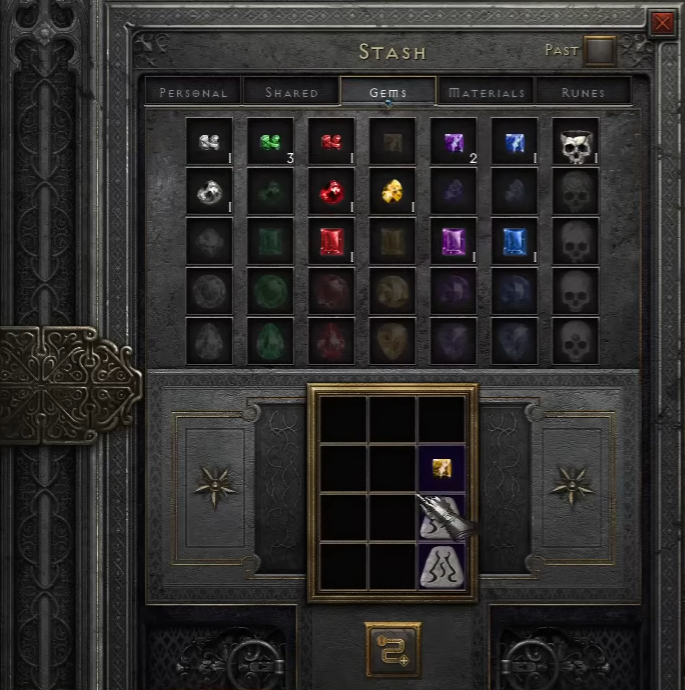
Three new specialized tabs: Gems, Runes, and Materials, keep all your component items neat and tidy. Each is designed for a specific set of items in Diablo 2 Resurrected:
Gems Tab: Holds all your gems in one place, letting you store and organize them, freeing up previously cluttered personal stash pages.
Runes Tab: Keeps every rune neatly stacked, essential for any serious crafter or min-maxer.
Materials Tab: Store key quest items, tokens, ingredients, world stone shards, and special drops like Uber Ancients Statues.
No more juggling mules or worrying about running out of space during farming sessions—the new tabs are engineered for convenience.
Functionality is the centerpiece of these changes. Each specialized tab can stack up to 99 copies of any eligible item (e.g., a single tab may hold up to 99 Tal runes or 99 Flawless Amethysts). Moving items in and out is easy, with hotkeys and right-click actions designed for rapid transfers:
Individual Movement: Shift items into or out of the tab one by one with precise clicks.
Bulk Movement: Use key combinations such as Ctrl + Shift + Left Click to move items directly into the Horadric Cube. For many stackable items like gems or runes, right-clicking can extract three at a time, perfect for common recipes.
Auto-Sorting: Place an item in the stash, and it automatically finds the correct stackable tab—keep your inventory clean with zero extra effort.
Special Materials Handling: Keys, organ drops, world stone shards, and event materials slot into the Materials tab. This includes special items introduced in RotW, such as world stone shards (used for terrorizing acts) and new statue items from terrorized bosses.
With these improvements, cubing, crafting, and upgrading materials get much quicker. No more back-and-forth: just open the stash, select what you need, and get right back into the action.
A top concern for many is how to move their items from the shared stash of the original expansion into the new Reign of the Warlock realm. Don’t worry — as long as you follow a clear process, your items will make the jump safely.
If you immediately convert all your old characters to the new realm, you risk losing access to the original shared stash. To prevent this, follow these steps:
Create a New Character in the Original Expansion (not Reign of the Warlock): When prompted, choose to make this character on the regular Expansion realm.
Log In and Access the Shared Stash: This character will have access to the old shared tabs, which still contain your valuable items.
Transfer Items from Shared to Personal Stash: Move everything you want to keep from the shared tabs into this character’s personal stash. The process may take several trips if your stash overflows.
Save and Exit: Once you’ve collected your items, leave the game and move to character selection.
Convert the Character to Reign of the Warlock: Select the character you just used, and choose the option to convert it to the new realm. Confirm the process.
Move Items into the New Stash Tabs: Log in with your newly converted character, and you’ll find all your items ready for transfer. Now, with five shared tabs available instead of three, you have plenty of space to organize everything in the new expansion's stash system.
Repeat as Needed: You can repeat this process as many times as necessary, using mule characters to gradually transfer everything from your shared stash in the old realm to the new one.
If you’re moving a whole collection of gear, it helps to make mules for the sole purpose of holding and transferring batches of items. Take care to move everything from shared stash to personal before converting each character over. Once complete, simply drop the items in-game (either by yourself or with a friend for extra security) and pick them up with your main character.
This step-by-step approach ensures that no treasured items are left behind, and all your equipment, runes, and crafting materials find their home in the upgraded stash system.




 items
items
 Order
Order Sell
Sell Live chat


